Showing posts with label Compositing. Show all posts

03 June 2012

Paul Friedl - The Leather Book Animation - 3D from Start to Finish - Training Video

It's been a slow time for me recently as far as Blender tutorial reviews go, so when I found out about a new video tutorial, off I went to go and have a look at it.

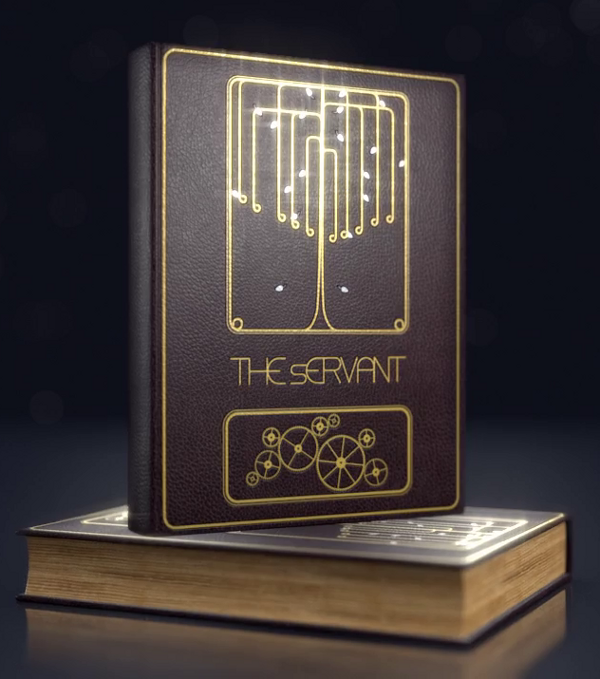
In this video tutorial Paul Friedl takes the viewer through the steps involved in creating a photo-realistic Leather Book Animation with simple animations and texturing techniques.

I haven't seen many commercial Blender video tutorials which cover the creation of the smaller more mundane objects such as books like this one. I have seen plenty of character modelling and larger hard body things such as cars and helicopters etc., but not smaller items.

To me these smaller and mundane objects are just as important to be able to create, so a tutorial such as this one is very welcome.

Product Specifications:
  • Name: The Leather Book Animation - 3D from Start to Finish
  • Author: Paul Friedl
  • Price: $19 (3 Dec 2011)
  • Type: Downloadable Video
  • Runtime : 214 Mins
To download the video tutorial I went to the 3D Animation Plus website which I had not heard of before. So I checked out the About section of the website and found out that it looks to have been setup recently. Looks very organised and well designed. If the about page is to be believed then it will be a good web site to keep an eye on as there will be other tutorials to follow. Paul Friedl owns the website and has been working in 3D for 6 years, so is not a 3D newbie.

Irrespective of how long Paul has been doing 3D the important question is, how good a video tutorial is this? I would have to say that on the whole the tutorial is very good and the end result (shown in the image) looks very good to my eye.

The downloading of the videos was very easy and hassle free for me. The downloads are very large so you will need a reasonably fast network connection.

Once the downloads had completed I was presented with an archive file which I extracted and this left me with 3 directories. The first directory named "The Leather Book: Scene Files" contains all of the resource files that you will need if you want to follow along with modelling the Leather Book Animation. All textures, soundtrack, blend files and even the fonts used are supplied. These resources are very useful and are good examples to use.

The other two directories contain the main Leather Book Animation video tutorial files and also a Blender Basics video tutorial for those new to Blender, which is used to get the new Blender user up to speed with using Blender. So even if you have never used Blender before you should be able to understand what is being described, if you first watch the supplied Blender Basics videos.

The tutorial videos are organised into 16 parts, and go in order from start to finish in creating the Leather Book Animation. There is also a bonus video showing the process of making weathered old looking leather.

Sections Listing:
  • Introduction
  • Modelling And UV Export
  • Layout Design In Inkscape
  • Layout In Blender
  • Layout Animated In Blender
  • Photo-realistic Texturing In Blender
  • Applying Textures In Blender
  • Compositing In Blender
  • Creating Camera Rigs In Blender
  • Camera Animation
  • Improvements For Shot 1
  • Improvements For Shot 2 And 3
  • Improvements For The Depth Of Field In Shot 3
  • Video Editing In Blender
  • Outro
  • Worn And Damaged Leather
The narration of the videos is very clear as Paul takes his time explaining what he is doing and why. Also on a more technical level the encoding of the videos is clear and easy to see. Blender is used for all the mesh modelling, compositing, animations and video editing done while creating the book, but Blender is not the only piece of software used. Other popular open sourced software is used. Gimp is used to create the initial base textures which are later used in Blender to creature realistic leather. Also used is Inkscape to create the cover art that is on the front of the finished leather book.

I found the use of Blender, Gimp and Inkscape very informative as to how powerful a combination they can be when creating products such as this book animation. The Gimp coverage will be extremely useful to Blender users for creating base textures. On the mesh modelling side of thing Paul uses very simple modelling methods which are very easy to follow but he uses these simple modelling methods to create very effective results. Good coverage is given to properly UV Unwrapping the modelled meshes.

The animation sections of the tutorial are good but somewhat rushed, but are still useful for learning how to do basic animation. It would have been nice to have Paul explain in more detail how to control which camera is used for shot output (with features such as Camera Marker Binding). However the method he used still works.

The compositing section of the video is very good, extensive explanations are given of the processes used to composite together the previously created Gimp textures. This was my favourite part of the whole video as lots of simple but very clever uses of the Compositor were described. It really shows the power that the compositor has.

So in closing, this is a really good product well produced and if you are a Blender beginner or intermediate level user you are bound to find something of interest to learn. It's always good when a new company starts producing Blender materials, so hopefully it will be worth keeping an eye on the website for new tutorials.

Review Score 78%

Roger Wickes - Foundation Blender Compositing - Book Review

Well another week and another Blender book to review.

This time around it's written by Roger Wickes a well known Blender user. I have reviewed other products made by Mr Wickes before and from what I remember I was impressed with them.

This time round Mr Wickes has graced the world with a book on compositing techniques using Blender.
  • Product Specifications:
  • Price : $31.39 (on 15th on Aug 2009 from amazon)
  • Useful page count : 447
  • DVD included : Yes

I was eager to get hold of this book and had it on pre-order the second I heard about it. Reason being that I knew there were no books specifically dedicated to using Blender for compositing tasks (at least when I ordered it). Also Mr Wickes has previously produced compositing videos that can be obtained from his website that also covered compositing. Those videos were very good and I was curious as to how this book would compare.

The first thing that I noticed about the book was that it looked very thick and chunky, physically very well made and good quality paper, also pleasingly the pictures and diagrams in the book were in full color.

Color pictures in any Blender related book are always useful and it definitely improves the usefulness of this book. Also handy was the color theme used in the screenshots, which made seeing the contents of the pictures much easier (the default gray theme of Blender really does not lend itself to being displayed in books).

The book is reasonably priced (at least when you get it from Amazon), when you take into account that you get color pages and a DVD also which is packed with very useful examples and resources.

A lot of Blender users see compositing as a bit of a black art. The end result usually being that they don't get a good grasp of how to use Blender's compositing abilities very well or they discover its power many years after they started using Blender. So you may think that this book is not for the beginning Blender user. This is not true.

Mr Wickes has used a large portion of the book going over the basic functions of Blender as they relate to the tools needed to do compositing tasks within Blender. So even if you are completely new to Blender you should be able to pickup this book and learn how to use Blender to composite.

Once the basics are covered (about halfway through the book), an almost complete treatment of the Blender Nodes Editor and Video Sequence Editor is covered (from the point of view of a compositor). Most of the useful Node and VSE features are described, both what they are for and how to use them.

For the most part everything is very well explained and only very occasionally do topics seem vaguely explained (though that could just be me being a bit slow). Some theory of compositing processes are explained, although I would have liked more theory explanations (i.e more depth on pixel math etc. and maybe more information on the various way nodes can be combined to make different compositing setups).

All in all very useful book especially when used in combination with the included DVD.

I am going to have to keep an eye on the Friend of ED publishers of this book and see if they come out with anymore Blender books. I hope they do as if this book is anything to go by, it will be worth getting.

Review Score 85%